
Key Insights
- Over the past year, IOD’s GenAI content workflow optimization reduced average client review cycle time by nearly 40% for tech leaders in the cloud, DevOps, cybersecurity, data, and AI spaces.
- By 2026, GenAI is everywhere in content workflows, but what really drives results is how you measure, track, and optimize the impact (not just how much automation you use).
- At IOD, we built automated systems to track workflow timing, client feedback, and delivery speed, so we could show real improvements and adjust quickly when needed.
- Because we measured every step in real time, we could see exactly where GenAI was making a real difference for our clients, and where we needed to focus our next improvements.
- This is an ongoing process. We review our data often and adjust our approach as client needs and business goals change.
- This article delivers practical guidance and ready-to-use scripts to help you measure, track, and optimize your own GenAI content workflows.
Measurement That Matters for Tech Content Marketing Teams in 2026
Over the last year, our clients have been able to get their content drafts up to 40% faster, without giving up any of the quality they expect. For every marketing and product team we work with, that’s what matters: a smoother path from brief to draft, less back-and-forth, and confidence that quality won’t slip.
GenAI was already part of our world at IOD, but when I came back from maternity leave, everything felt like it was moving twice as fast. New workflows, new tools, and a real sense that we needed to prove (not just hope) that these changes were making a difference.
Ofir, our CEO, pulled me aside and was clear:
“We need to measure everything. I want to know, for sure, if our GenAI efforts are actually making our workflows more efficient and helping clients get content faster.”
I felt the pressure, but also a lot of excitement. It was a chance to really shape how we worked, to experiment alongside our design partners, and to see if we could turn all this innovation into real, measurable improvements.
My job quickly became equal parts builder, tester, and detective.
We rolled out new processes, measured every step (from brief to outline, outline to draft, and all the review cycles in between), and worked closely with our design partners to see what actually worked in the real world.
There were times when everything seemed to be changing at once, and it was not easy to keep up. But seeing that even small changes made a big difference for our clients made all the effort feel valuable. The biggest reward was hearing from clients that things felt smoother and faster, before they ever saw our numbers.
Building a Data-Driven Approach to Workflow Improvement for Tech Marketers
When I started digging into our process, my first question was:
“How can we actually see, in the data, where things are working for our clients and where they aren’t?”
My goal in leading this effort at IOD GenAI Labs is not only to optimize for internal efficiency but to ensure our workflows genuinely make review cycles smoother and faster for every client. This meant finding metrics that could clearly show if we were actually saving time and improving outcomes, not just creating the appearance of progress.
Why Manual Tracking Was Not Enough
Early on, I tried counting and analyzing client review comments manually, copying them from Google Docs into spreadsheets and sorting through them one by one. With multiple articles, reviewers, and review cycles, this quickly became impossible to scale.
But copying all those review comments by hand was tedious; I always felt like I’d missed something important. I knew we needed automation to get reliable insights, support a growing content volume, and give clients the confidence that our improvements were backed by real numbers.
How I Used Automation in Our Workflow
I focused on automating the areas that mattered most for accuracy and efficiency. With ChatGPT’s help, I generated Google Apps Script code that could export review comments from a list of Google Docs into a single Google Sheet. This replaced hours of copying and pasting with a much faster, more reliable collection process.
I learned fast that the results you get from GenAI depend a lot on how you structure your prompts.
At IOD, we’ve found that prompt design is a core skill, one we’re always refining and sharing with our team. The way you phrase requests to the AI can make a huge difference in the quality of the output, whether it’s code or content. That’s why we developed a practical approach to prompt-writing for marketers, which you can see in our guide to GenAI prompt design.
Below you can see a Google Apps Script that centralizes Google Docs comments across multiple files into a single spreadsheet for easy review, analysis, and reporting.
					function exportCommentsForDocLinks() {
// EDIT: The document links shown here are example google docs. Replace them with your own Google Docs URLs (including the /edit suffix). Put as many links as you like.


const DOC_LINKS =["https://docs.google.com/document/d/1-DV55h1Ud5uFiEuIcesIJVsaeJKf3gTgVeI_scga9W4/edit",
"https://docs.google.com/document/d/18Kdpnb52Z8PZ6Mj_o8tr-jTDgMObVc3UwyY4qMYnAqI/edit"];


 if (!DOC_LINKS.length) {
   throw new Error("No document links found. Please add them in DOC_LINKS.");
 }


 // Code creating the output Google Sheet
 const ss = SpreadsheetApp.create("Google Docs Comments Export (Selected Docs)");
 const sh = ss.getActiveSheet();
 sh.appendRow([
   "documentName",
   "documentGroup",
   "documentID",
   "documentURL",
   "commentID",
   "createdTime",
   "modifiedTime",
   "resolved",
   "authorName",
   "authorEmail",
   "commentText",
   "commentCharLength",
   "commentWordCount",
   "quotedContext",
   "replyCount"
 ]);


 const headers = { Authorization: "Bearer " + ScriptApp.getOAuthToken() };
 let processed = 0;


 // Iterate over each document link or ID


 for (const input of DOC_LINKS) {
   const fileId = extractDocId(input);
   if (!fileId) {
     Logger.log("Skipping (could not parse as Doc ID): " + input);
     continue;
   }


   // Get document metadata (title + URL)
   let fileMeta;
   try {
     fileMeta = Drive.Files.get(fileId);
   } catch (e) {
     Logger.log(`Could not read metadata for ${fileId}: ${e}`);
     continue;
   }


   const docTitle = fileMeta.title || "";
   const docName  = docTitle;
   const docUrl   = fileMeta.alternateLink || `https://docs.google.com/document/d/${fileId}/edit`;


   const baseUrl =
     `https://www.googleapis.com/drive/v3/files/${encodeURIComponent(fileId)}/comments` +
     `?fields=comments(` +
     `id,createdTime,modifiedTime,resolved,` +
     `author(displayName,emailAddress),` +
     `content,quotedFileContent/value,replies(id)` +
     `)&pageSize=100&includeDeleted=false`;


   let pageToken = null;
   do {
     const url = baseUrl + (pageToken ? `&pageToken=${encodeURIComponent(pageToken)}` : "");
     const res = UrlFetchApp.fetch(url, { headers });
     const json = JSON.parse(res.getContentText());


     const comments = json.comments || [];
     for (const c of comments) {
       const text = (c.content || "").toString();
       const charLen = text.length;
       const wordCount = text.trim() ? text.trim().split(/\s+/).length : 0;


       sh.appendRow([
         docName,
         docTitle,
         fileId,
         docUrl,
         c.id || "",
         c.createdTime || "",
         c.modifiedTime || "",
         c.resolved === true,
         (c.author && c.author.displayName) || "",
         (c.author && c.author.emailAddress) || "",
         text,
         charLen,
         wordCount,
         (c.quotedFileContent && c.quotedFileContent.value) || "",
         (c.replies || []).length
       ]);
     }


     pageToken = json.nextPageToken || null;
   } while (pageToken);


   processed++;
 }


 SpreadsheetApp.flush();
 Logger.log(`Done. Processed ${processed} document(s).`);
 Logger.log(`Sheet URL: ${ss.getUrl()}`);
}


/** Extract a Google Doc ID from:
*   - /document/d/{ID}
*   - ?id={ID}
*   - bare IDs */


function extractDocId(input) {
 if (!input) return null;


 // Normalize: coerce to string, strip quotes/brackets, zero-width, etc.
 let s = String(input)
   .replace(/[\u2018\u2019\u201A\u201B\u2032]/g, "'")
   .replace(/[\u201C\u201D\u201E\u2033]/g, '"')
   .replace(/[\u00A0\u2000-\u200A\u202F\u205F\u3000]/g, ' ')
   .replace(/[\u200B-\u200D\uFEFF]/g, '')
   .trim()
   .replace(/^[<\[\(\{"'\s]+|[>\]\)\}"'\s]+$/g, "");


 const idLike = /^[A-Za-z0-9_-]{20,200}$/;


 // /document/d/{ID}
 const mPath = s.match(/\/document\/d\/([A-Za-z0-9_-]{20,200})/);
 if (mPath && mPath[1]) return mPath[1];


 // ?id={ID}
 const mQuery = s.match(/[?&]id=([A-Za-z0-9_-]{20,200})/);
 if (mQuery && mQuery[1]) return mQuery[1];


 // Bare ID
 if (idLike.test(s)) return s;


 // Fallback: longest ID-like token in string
 const candidates = s.match(/[A-Za-z0-9_-]{20,200}/g) || [];
 if (candidates.length) {
   candidates.sort((a, b) => b.length - a.length);
   const best = candidates.find(tok => !/^(utm_|gclid|fbclid)/i.test(tok)) || candidates[0];
   if (idLike.test(best)) return best;
 }


 return null;
}


// Debug helper: Logs character codes of a string (for diagnosing hidden


function _debug_chars(str) {
 const codes = Array.from(String(str)).map(ch => ch + " U+" + ch.charCodeAt(0).toString(16).toUpperCase());
 Logger.log(codes.join(" | "));
}
Adding Manual Layers for Real Insights
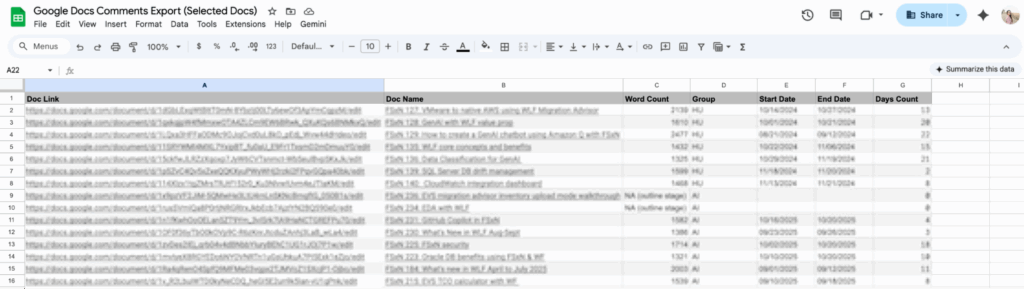
After collecting the data automatically, I enriched it by manually adding key metadata (e.g., document names, word counts, project stages, and the start and end dates for each review cycle), which I pulled from our project management tool Asana.
By connecting these details with simple spreadsheet formulas, I was able to link the raw comment data to a bigger picture: seeing how review feedback tracked with article complexity, client, or production timeline.
This combo of automation and manual enrichment meant I could filter, group, and compare results across different articles, review cycles, and workflow types. This made it a lot easier to spot where GenAI was improving outcomes and where more fine-tuning was still needed.

What the Data Shows (and Why I Keep Measuring)
With this blend of automation and hands-on analysis, I can now track and compare key indicators over time, such as:
- The number of review comments per article or cycle
- The average length and detail of client feedback
- Turnaround time between production stages
We saw our biggest improvements in content delivery speed. For example, the time from brief to outline was 38% shorter year over year. Time from approved outline to a first draft improved as well: 39% shorter year over year and 27% shorter quarter over quarter. Both we and our clients have felt a clear difference in how quickly we can move from concept to deliverable.
By consistently measuring each step, we’re able to spot where GenAI is really accelerating our workflows, where there’s still friction, and where more fine-tuning is needed.
Lessons Learned and My Approach Moving Forward
This project reinforced just how important it is to measure each part of the process, not just the end result. Automation made it possible to capture reliable data at scale, but manual review was still essential for interpreting those results and connecting them to real client needs.
For example, while our delivery times improved, the average volume and length of client comments didn’t change as much as we hoped, at least in the initial stages, since training custom GenAI agents takes time. That tells us there’s still room for optimization, especially in how we prompt, brief, or guide reviewers through GenAI-enabled drafts.
Our process is never “set and forget.” We continuously review, analyze, and adjust our workflows as client requirements and project volumes evolve. This helps us deliver consistent, visible value (faster delivery times, actionable metrics, and more flexibility for our clients), even as GenAI tools and client expectations continue to change.
At IOD, we believe a results-driven approach is the key to long-term success for both our team and our clients. These lessons continue to drive our experiments and innovation at IOD GenAI Labs, as we develop practical solutions for leading tech brands in cloud, DevOps, cybersecurity, data, and AI.
Key Takeaways: Measurable Results, Not Just Automation)
GenAI is just a normal part of IOD content operations in 2026, but at IOD GenAI Labs, I see my job as more than just setting up automation. I’m always measuring, adjusting, and looking for new ways to make things better for every client.
Using automation to collect the data, and then actually digging into it myself, helps me figure out what’s really working in our workflows and what still needs work.
What matters most to me is seeing those changes pay off: when review cycles get shorter, content gets delivered faster, and clients actually notice things are running more smoothly. At the end of the day, being able to show those results with real numbers and real improvements is what counts when you want to scale content for any tech brand.
If you’re building or scaling your own content operations, check out our guide to building your content machine.
Ready to drive performance with practitioner-led, GenAI-powered marketing?


