Originally published · Updated
The two years of guessing at LLM visibility are ending. Google added generative AI performance reports to Search Console in June this year, showing impressions in AI Overviews and AI Mode. Now OpenAI is sharing first-party data directly with businesses.
Let’s be honest, as expected, it is only a matter of time before OpenAI adds more features, the same as we already know from Google Analytics and Search Console (I hope the UI will be much more appealing), and obviously the skills to learn from the performance data and act on it. The other LLMs will follow, and I assume the LLM visibility companies are already in panic mode.
OpenAI’s Business Hub is a free ChatGPT dashboard that shows how often your business is mentioned, clicked and surfaced. Here’s what it shows, how to claim it, and how it compares to Profound, AirOps and other LLM visibility tools.
[ TL;DR ]
Key takeaways
- OpenAI now shares first-party ChatGPT visibility data with businesses, much like Search Console did for Google.
- Business Hub shows mentions, website clicks, and discovery topics, not individual prompts.
- Claiming is reported as free. After DNS verification, my dashboard was running in about 30 minutes.
- It covers ChatGPT only for now, so claim your profile and keep monitoring other AI engines.
What is Businesses in ChatGPT?
Businesses in ChatGPT is OpenAI’s new platform feature letting eligible businesses claim, verify, and manage how they appear inside ChatGPT. With 1.2 billion people using ChatGPT every week, per OpenAI’s November 2026 announcement, it is a discovery channel too large to ignore.
The feature has two components:
- Business Hub (at chatgpt.com/business-hub), OpenAI’s claiming and insights dashboard, is broadly available. It lets any eligible business verify its presence, update information, and access aggregated engagement data.
- Business Agents (distinct from ChatGPT’s internal Workspace Agents) are conversational agents that eligible businesses build, test, and launch inside ChatGPT. They are currently available only to eligible ecommerce and online service businesses in the US.
The closest reference point is Google Business Profile together with Search Console. Business Hub combines a profile you manage with performance data, inside ChatGPT.
Before you start: ChatGPT may already be surfacing information about your business before you claim. Claiming does not create the profile. It verifies it, lets you update the details ChatGPT may use, and gives you access to insights. Per OpenAI’s Businesses in ChatGPT page, claiming does not guarantee higher placement or sales.
This is a big step forward for anyone working on GEO and AEO. Business Hub is the first native data source from a major AI platform showing practitioners how their brand appears in AI answers. For the other models, including Claude, Perplexity and others, we still have to use systems that only guess. I’ll get to that later on.
What does OpenAI Business Hub show you vs. Profound or Peec AI?
Business Hub shows you three things: how often ChatGPT mentions your business, how often users click through to your site, and the topics that bring your business into ChatGPT answers. Unlike tools such as Profound or Peec AI, which simulate prompts across many engines, Business Hub reports ChatGPT’s own aggregated data. These are aggregated figures, shown only above a minimum conversation threshold that OpenAI has not publicly disclosed.
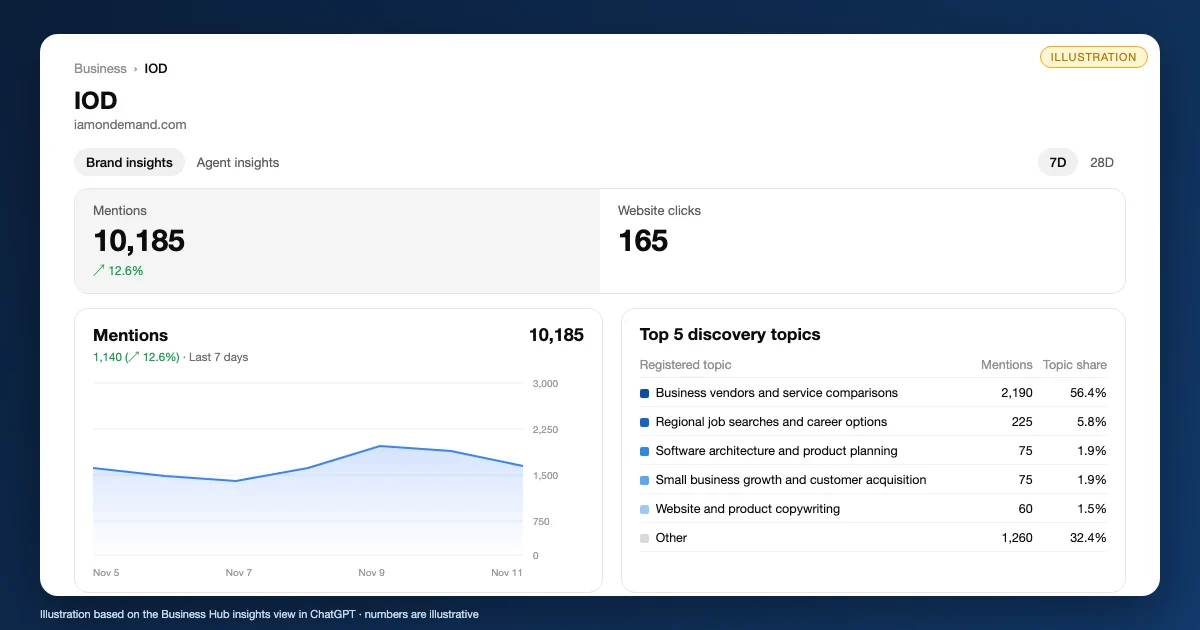
Mentions show the number of times ChatGPT cited your business, aggregated across conversations.
Website clicks show how often users clicked through to your site from a ChatGPT response. A reported click is not a confirmed website visit. Practitioners reconciling Business Hub click counts against analytics platforms should expect discrepancies, as a reported click and a recorded session are not the same measurement.
Discovery topics are the common themes across conversations where ChatGPT cited your business. These are aggregated themes, not specific prompts. They are not equivalent to keywords or search queries, and they should not be treated as prompt-level data. Business Hub’s discovery topics show you what subjects bring your business into ChatGPT answers, in aggregate.
Insights appear only above a minimum conversation threshold that OpenAI has not publicly disclosed. If that threshold is not met, no data appears. OpenAI does not share users’ conversations or Business Agent chats with businesses.
Scope limit: Mature, feature-rich LLM visibility tools, platforms that measure how often a brand appears in AI answer engine responses, such as Profound and Peec AI, track multiple engines, run simulated prompts, and surface competitor comparisons across AI answer engines. Business Hub covers ChatGPT only. It shows no specific prompts and no competitor comparisons. For teams already running tools like those, Business Hub adds a first-party data layer for ChatGPT. It doesn’t replace cross-engine monitoring. If you’re evaluating where Business Hub sits in your stack, IOD’s guide on how to choose an AI visibility tool walks through what to look for.
How to claim your business in ChatGPT
Claiming your business lets you verify your presence, update information ChatGPT may use, and access engagement insights. Per OpenAI, claiming does not guarantee higher placement or sales. Here is what to do.
Before you start, have these ready:
- A live website that ChatGPT can reference
- An authorized owner or representative ready to verify
- Accurate business descriptions, categories, and contact details
- Product data with pricing and availability, if you sell products
Steps:
- Go to chatgpt.com/business-hub and sign in to ChatGPT.
- Search for your business by name and select your listing.
- Verify that you own or are authorized to represent the business, following the steps Business Hub shows you.
- Once verified, the blue check appears on your profile. Update key details: description, categories, contact info, and links. If you sell products, add a self-service product feed with pricing and availability.
- Review your insights. Once I added the DNS record and got verified, finalizing all the steps, it took about 30 minutes to get my dashboard running.
- Learn more about Business Agents and ads in ChatGPT at OpenAI’s Business Agents policy and OpenAI’s advertising announcement.
Per OpenAI, claiming does not guarantee higher placement or sales. You get a verified profile and insights, and ChatGPT keeps making its own recommendations.
What will LLM visibility tools do now?
For the first time, a major AI platform is sharing first-party visibility data directly with businesses, and it is free. The parallel to Google Analytics and Search Console is direct. When Google made those tools free and native, no third-party analytics vendor could match the structural advantage of the platform that owns the data. That is not a surprise. It is the pattern every major platform has followed: own the data, then give away the reporting.
Profound and similar LLM visibility tools use real UI queries or API-based approaches to infer visibility across multiple engines. That is a useful cross-engine view. But Business Hub gives you something those tools cannot replicate: the actual aggregated data from the platform that runs the conversations. When the platform publishes its own reporting, reporting alone becomes a free feature. LLM visibility vendors will need to build real execution capability, content creation and distribution, because that is where the real value moves.
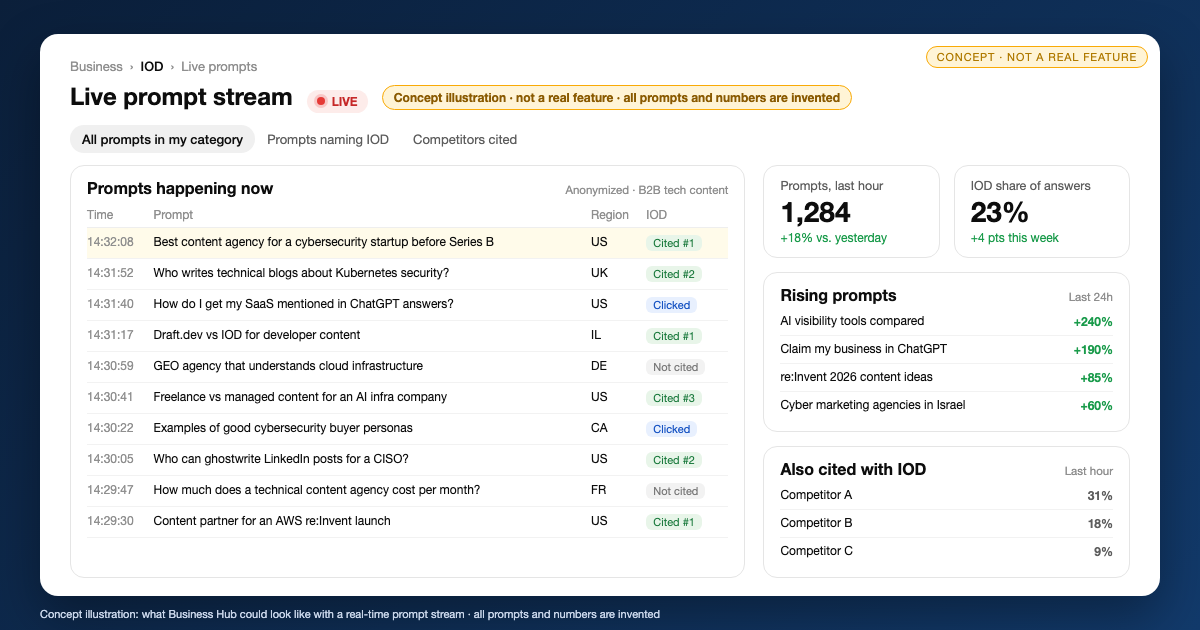
Today’s limits are real: Business Hub covers ChatGPT only, shows no specific prompts, and surfaces no competitor comparisons. What would really impress me is a real-time log of clients and users running prompts relevant to my industry, or about my brand. Platforms such as AirOps are already moving toward running managed services, and I think that direction makes sense. I do debate whether product companies can keep that promise to their investors, though. I have other ideas about where these types of products can develop, but I’ll keep those for other articles.
In comparison to third-party LLM visibility tools, platforms that measure how often a brand appears in AI answer engine responses, OpenAI’s new capability covers ChatGPT only, for the time being. I can already think about interoperability, turning these into multi-LLM visibility tools, like we had with the cloud, where Google Cloud dashboards also showed AWS resources in a multi-cloud setup.
What should B2B tech marketers do now?
Here are five things to do now.
- Claim your profile now, even in beta. Business Hub is reported as free (Reuters, Nov 11). The data infrastructure is live. Waiting provides no advantage, and claiming takes minutes.
- Treat discovery topics as a content brief signal. Business Hub’s discovery topics show aggregated themes from conversations where ChatGPT cited your business. Use them to identify what subjects pull your business into ChatGPT answers, then brief content around those topics. Read the structural plays for LLM discoverability alongside this data. Do not treat discovery topics as a keyword research equivalent.
- Keep content accurate and expert-written. In my experience, the content ChatGPT cites tends to be specific, sourced, and accurate. That is a content strategy requirement, not a Business Hub feature. IOD’s guide to generative engine optimization covers what it takes to build content that earns AI citations.
- Keep measuring other AI engines. Business Hub covers ChatGPT only. Gemini, Perplexity, Claude, and Google AI Overviews require separate monitoring. If you are evaluating agencies that combine monitoring with content execution across engines, start with the GEO/AEO agencies guide for cybersecurity companies.
- Keep your profile current: update your description and details in Business Hub whenever your positioning or offering changes.
Business Agents are open only to eligible US ecommerce and online service businesses for now. Keep your eye open for agents as the beta expands, and make sure you try ChatGPT Ads.
[ FAQ ]
Frequently Asked Questions
Is it free?
Claiming a profile through Business Hub is reported as free, per Reuters (November 11, 2026). OpenAI has not published a comprehensive pricing structure for the full feature set. No other pricing statement is confirmed.
Does claiming improve ranking in ChatGPT?
Per OpenAI, claiming does not guarantee higher placement or sales. ChatGPT continues to make independent recommendations. The blue check identifies the profile as claimed. It does not influence how ChatGPT retrieves or ranks content about your business. Claiming gives you data and a verified profile, not preferential treatment.
Can I see the prompts people use?
Business Hub’s discovery topics are aggregated themes, not specific prompts. You cannot see the individual queries that led to your mentions. Insights appear only above a minimum conversation threshold that OpenAI has not publicly disclosed.
Who can create a Business Agent?
Business Agents are currently available to eligible ecommerce and online service businesses in the US only. B2B tech companies should check eligibility as the feature expands beyond the current beta. Any eligible business can claim Business Hub. Business Agents require a separate eligibility determination.
How is Business Hub different from LLM visibility tools like Profound or Peec AI?
Business Hub reports ChatGPT’s own aggregated data: mentions, website clicks and discovery topics. Tools like Profound and Peec AI run simulated prompts across many AI engines and add competitor comparisons. Business Hub covers ChatGPT only and shows no competitors, so it adds a first-party layer rather than replacing those tools.
How long does it take to claim a business in ChatGPT?
In my case, about 30 minutes. Once I added the DNS record and got verified, finalizing all the steps, my dashboard was running. Insights only appear once your business passes OpenAI’s minimum conversation threshold.
What information can ChatGPT use from my Business Hub profile?
Your description, categories, contact details and links, plus a product feed with pricing and availability if you sell products. Per OpenAI, ChatGPT may use this information to answer questions about your business, but claiming does not guarantee higher placement.
Now that Business Hub shows you one engine’s data, the real question is what content earns citations across all of them. Talk to IOD Tech Content about GEO/AEO strategy and the content that gets you cited.